Step Transition
Step Transition
Step Transition depends on few parameters, as show in the figure :
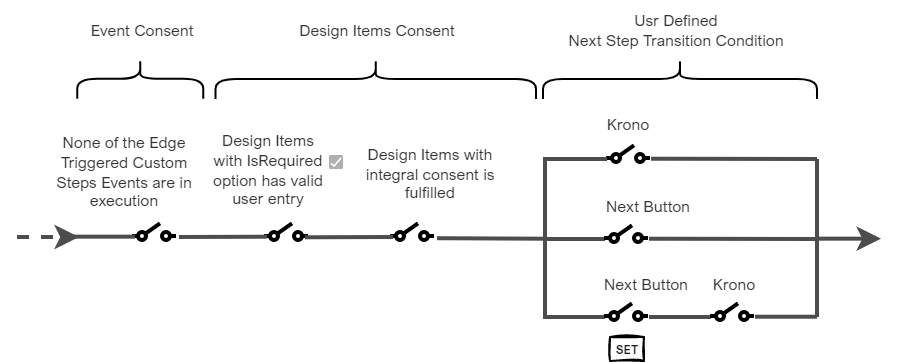
Step Transition Mechanism
User Defined Next Step Transition

User Defined Next Step Transition is located at Step Configuration Panel
User Defined Next Step Transition Options
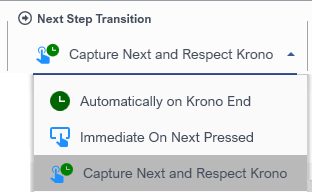
User Defined Next Step Transition Options
|
Option |
Run-time behavior |
|
Automatically on Krono End |
Assuming Event and Design Item Consents are satisfied within Krono time, flow will move to Next step automatically. If Event and Design Item Consents are not satisfied within Krono time, a Next Button will appear in the context menu, and flow will not move to Next step automatically. In this case, operator should click appearing Next button. |
|
Immediate On Next Pressed |
Operator should click the Next button. |
|
Capture Next and Respect Krono |
Flow will move to Next step automatically when Krono time is elapsed assuming that:
If Event and Design Item Consents are not satisfied, and/or Next Button click is not captured within Krono time, flow will not automatically move and will wait for the conditions to be satisfied. |
|
|
Next Button in the context menu will not be available for the operator clicking as long as Design Items Consent is NOT fulfilled. |

|
|
On Overtime, meaning that Step Transition Conditions are not met within Krono time, designer configures what to happen. See On Overtime Action section for detailed information. |