Stop Feedback
Stop Feedback
In Run-time, when the user want to stop the execution, depending on the Stop type, he is asked to provide feedback by selecting a feedback item.
Stop Feedback Options are defined within a Job.

Located within Job Menu items
Stop Feedback Types
|
Symbol |
Stop Feedback Kind |
Remark |
|
|
On Fault |
Displayed when requested Stop type is On Fault |
|
|
On Demand |
Displayed when requested Stop type is On Demand |


|
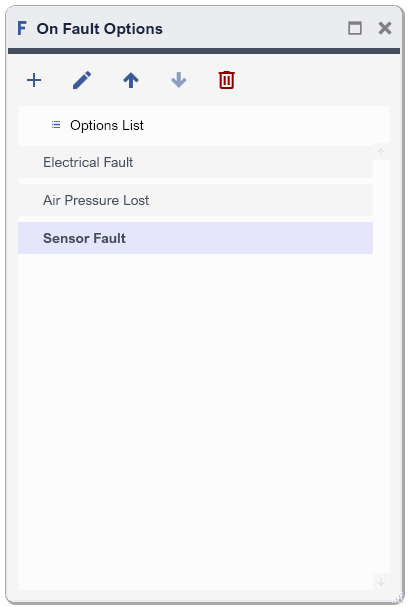
On Fault Options |
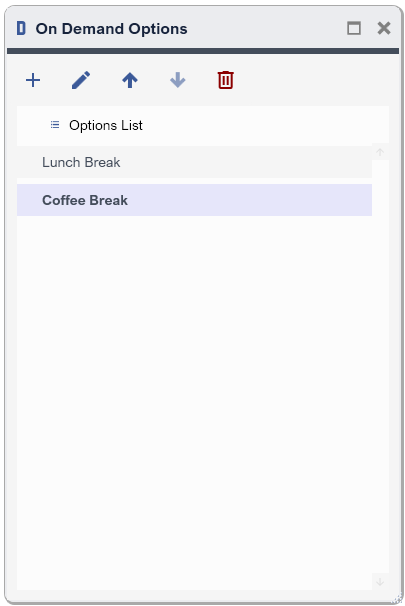
On Demand Option |
|
Configure the list, and it will be displayed when the user requests a Stop type On Fault.
Example of Stop Feedback Options : OnFault |
Configure the list, and it will be displayed when the user request a Stop type On Demand.
Example of Stop Feedback Options : OnDemand |
|
Toolbar Button |
Description |
|
|
Add item to the List |
|
|
Edit selected item |
|
|
Move up selected item |
|
|
Move down selected item |
|
|
Delete selected item |