Tcp Client
Overview
TCP Client/Server Communication establishes a two-way connection between a server and a single client. Deskval Workbench acts as a Client, the device that " dials the phone".
Configuration of Deskval Workbench Tcp Clients
Deskval Workbench offer 3 Tcp Client.
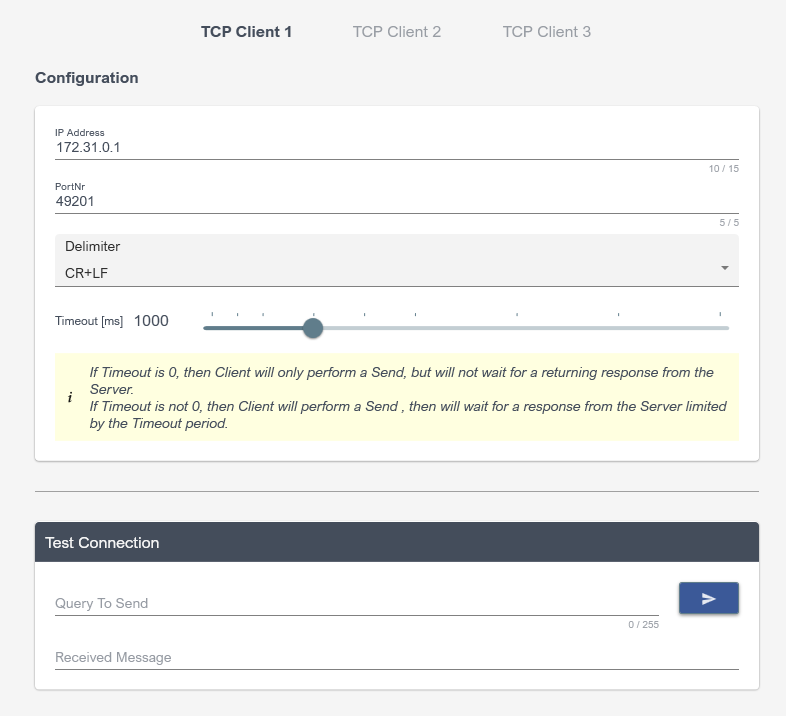
Configuring Tcp Clients
Using Tcp Client Communication
In an event, use Assignment Action and employ TCPCLIENT_QUERY function.
|
Sends sQuery to the Tcp Client, determined by the ClientNr - Configured in Settings - and returns a Text received from the TcpClient in response to sQuery In case an error occurs, returns the following Error Message as text , accordingly. ERR_NOCONNECTION ERR_CONNECTIONREFUSED ERR_TIMEOUT |
|
TCPDEVICE_QUERY ( 1 , HelloWorld ) will send HelloWorld to the TcpClient1 and then wait for the response. If TcpClient1 responds, then function will return the response. |

Use of TCPCLIENT_QUERY function in Assignment Action