Ads Client
Overview of Ads
Ads (Automation Device Specification) is the communication protocol of Beckhoff Twincat. For detailed information, visit https://infosys.beckhoff.com/
Beckhoff Twincat acts as Server, and it allows Ads Clients to exchange data via its Message Router. In Message Router, an Ads device is uniquely identified by AMS Net ID.
Deskval Workbench is an Ads Client
Deskval Workbench is an Ads Client and exchanges a list of predefined data in a Beckhoff Twincat Plc program.
What is exchanged with Deskval Workbench and Twincat
Deskval Workbench exchanges his Ads Tags and Batch Tags with a predefined data in the Beckhoff Twincat Plc program.
Deskval Workbench reads and writes Ads Tags according to its direction. Ads Tags that have In direction is read, tags that have Out direction is written to the Plc.
BatchTags array is read from the Plc, and the value is assigned to the Batch Tag if the its linkage is Ads.
In order for this exchange, Beckhoff Twincat Plc program should have a Global Variable List - in below illustration it is named as Deskval - and should contain the following data illustrated in the below figure:
Note that, as the exchange mechanism uses the names and array sizes, watch for the correct name and array sizes.
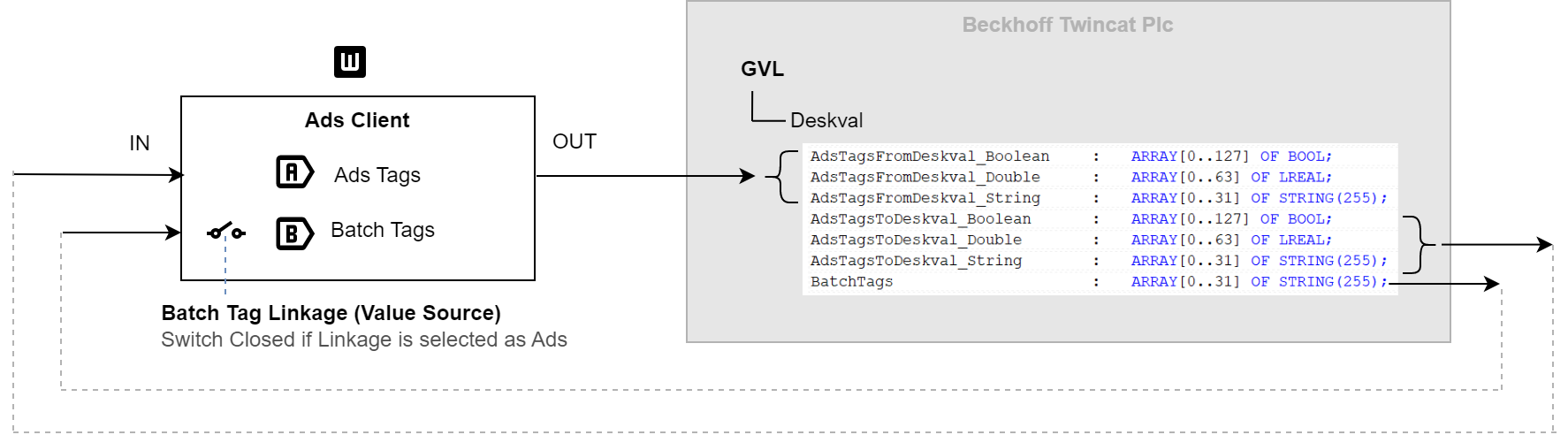
Data exchange in Ads Communications
Ads Tags 
|
Deskval Workbench Ads Client Tags |
Description |
||||||||
|
|
|
||||||||
|
Output |
|

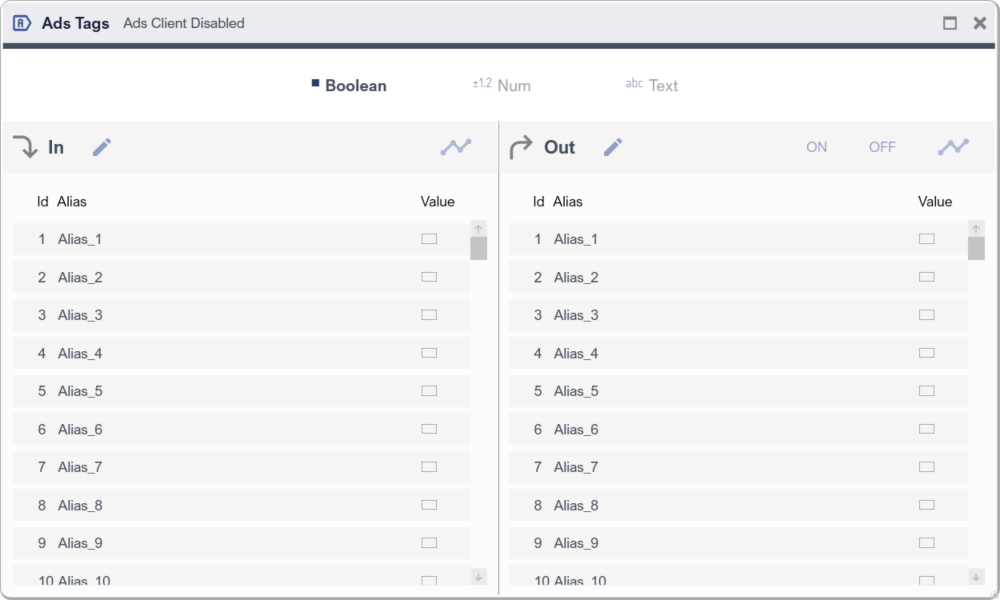
Ads Tags
Setting up an Ads Communication
|
|
Check our YouTube channel for explanatory videos https://www.youtube.com/@Deskval |

In order to setup Ads communication, there are things to do, both in Deskval Workbench and Beckhoff Plc side.
- Setting Up Deskval Workbench
- Make sure the PC where Deskval Workbench installed has a TC1000 ( Twincat3 ADS .Net ) installation. If not, download and install.
|
|
Visit https://www.beckhoff.com to download TC1000 ( Twincat3 ADS .Net ). Note that TC1000 is a free tool offered by Beckhoff. |
- Go to Settings > Ads Client
- Enter AmsNetId and AmsPortNr of your Beckhoff Plc. See Appendix > How To's > Find AmsNetID
- Put Enable tick
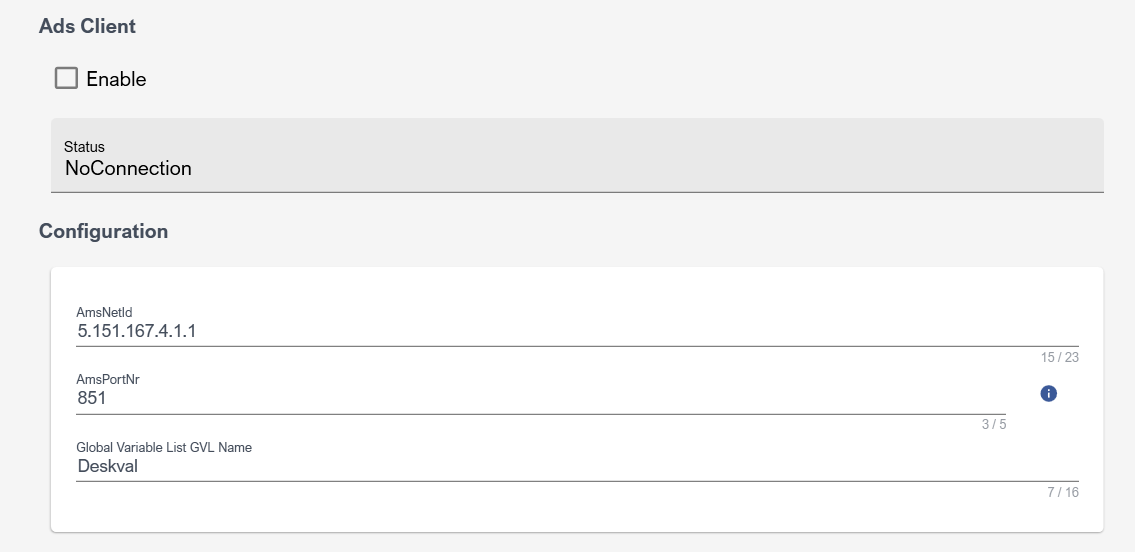
Example of Deskval Workbench Ads Client Settings
- Setting Up Twincat Plc Side
- Make sure your Beckhoff Plc has a route to the Pc where Deskval Workbench with a TC1000 is installed . If not, add Deskval Workbench Pc to route list.
- In your Twincat Project, Add a GlobalVariableList
- Add the following Variables to your Global Variable List:
|
AdsTagsFromDeskval_Boolean |
: ARRAY[0..127] OF BOOL; // Written by DeskvalWorkbench. |
|
AdsTagsFromDeskval_Double |
: ARRAY[0..63] OF LREAL; // Written by DeskvalWorkbench. |
|
AdsTagsFromDeskval_String |
: ARRAY[0..31] OF STRING(255); // Written by DeskvalWorkbench. |
|
AdsTagsToDeskval_Boolean |
: ARRAY[0..127] OF BOOL; // Read by DeskvalWorkbench. |
|
AdsTagsToDeskval_Double |
: ARRAY[0..63] OF LREAL; // Read by DeskvalWorkbench. |
|
AdsTagsToDeskval_String |
: ARRAY[0..31] OF STRING(255); // Read by DeskvalWorkbench. |
|
BatchTags |
: ARRAY[0..31] OF STRING(255); // Read/Write by DeskvalWorkbench. |
Deskval Workbench - Beckhoff Plc Ads Communication Example
PLC sample program that communicate with Deskval Workbench via Ads is provided for your convenience:
|
Plc |
IDE |
Remark |
|
Beckhoff |
Twincat 3 |
Please visit https://github.com/Deskval |