Order Mode
Order
An order is basically a Job-Quantity pair accompanied by an  OrderId and
  WorkOrderId.
Order Modes
Order Mode specifies how the order is sourced for production.

Located within Console
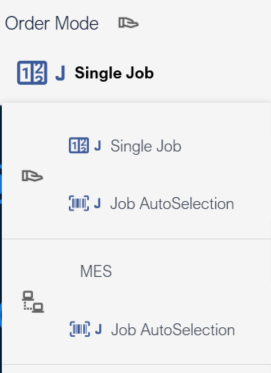
Order Mode selection drop down
Deskval Workbench has the following Order Modes:
|
Symbol |
Symbol |
Order Mode |
Remark |
|
|
|
In this mode, you can select a Job in the Workbench and execute. You can determine the number of executions. |
|
|
|
In this mode, you can scan a Barcode, and the Job corresponding to the Barcode will be executed. Pairing Jobs with Barcodes is managed via Job AutoSelect Configurator. Quantity will be 1 for each barcode scan / execution. |
||
|
|
|
In this mode, the list of Jobs and quantities to be executed are sourced by WMES application. |
|
|
|
In this mode, you can scan a Barcode, and the corresponding predefined event is executed. Thus, one has the possibility to make an api call, collect the OrderId, WorkOrderId, JobName and Quantity from a remote host, and start the Job correspondingly. See Job AutoSelect Configurator to create your actions in the predefined event. |